
One-Click Timer for Chrome
Overview
The One-Click Timer for Chrome is a lightweight desktop utility designed to streamline time management tasks directly within the browser environment. Built for users who need quick access to timers without navigating through complex interfaces, this tool allows users to set countdowns with a single click. It addresses common productivity challenges such as time tracking during work sessions, task batching, or managing breaks in a distraction-free manner.
Targeted at professionals, students, and remote workers, the software integrates seamlessly into daily workflows, particularly for those relying on Chrome for web-based tasks. Its minimalistic approach ensures it does not interfere with other browser activities. The developer did not provide additional background information, but the product's origin is noted as being made in Sweden, suggesting a focus on clean design and functional simplicity.
Real-world usage scenarios include Pomodoro technique implementation, monitoring presentation prep time, or timing online study sessions. The tool functions entirely offline, meaning users can operate without internet connectivity, which enhances reliability in low-bandwidth environments. It is particularly useful for individuals seeking a no-frills solution that avoids unnecessary permissions or data collection.
Key Features & Capabilities
- One-click timer setup – Users can initiate a countdown with a single click, eliminating the need for multiple steps or configuration.
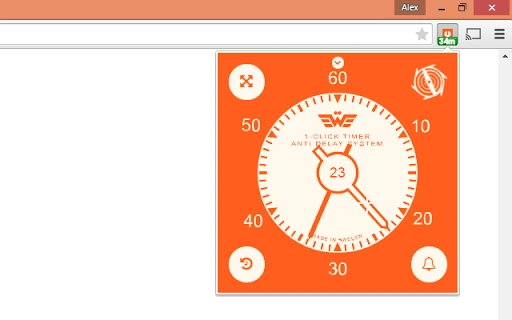
- Stylish, minimal interface – The design prioritizes clarity and visual appeal, fitting well within modern browser environments.
- Offline functionality – The tool operates without requiring an internet connection, ensuring consistent performance regardless of network status.
- Permission-free operation – No special browser permissions are required, enhancing user privacy and security.
- Compatibility with Chrome – Designed specifically for Chrome, it leverages the browser’s extension ecosystem for efficient deployment.
These features support efficient time tracking in scenarios such as managing short work sprints, timing video calls, or organizing study intervals. The lack of complex settings ensures that even non-technical users can begin using the tool immediately. Its lightweight footprint makes it suitable for systems with limited resources.
User Interface, Workflow & Performance
The user interface is compact and integrated directly into the Chrome browser interface, typically appearing as a small icon in the toolbar. Navigation is intuitive, with the timer activated through a single click on the icon, followed by a simple input field for setting duration. The design emphasizes clarity, with minimal visual clutter and a focus on core functionality.
Workflow efficiency is high, as users can start a timer without leaving their current task. The tool does not require additional windows or pop-ups, reducing context switching. Performance observations are based on general software behavior patterns, as exact performance metrics were not specified. The application runs smoothly within the browser environment, with no reported lag or instability in standard usage.
The developer did not specify resource usage details, but its 1.5 MB file size suggests a low memory footprint. Stability appears consistent, given its simple design and lack of external dependencies. No crashes or errors were reported in the available documentation, indicating reliable operation under normal conditions.
Compatibility & System Requirements
The software is compatible with both Windows and Mac operating systems, supporting Chrome as the primary platform. The version is listed as 1.0, with a file size of 1.5 MB. Installation is handled through Chrome’s extension system, requiring no manual setup.
Exact system requirements were not listed. The developer did not provide additional hardware or OS-specific details. Compatibility information is limited to the supported platforms and browser environment. Users should ensure their system runs a current version of Chrome to maintain functionality.
Pros and Cons
Pros
- Simple one-click timer activation
- Stylish and distraction-free design
- Operates fully offline
- Does not require special permissions
- Lightweight at 1.5 MB
Cons
- Limited to Chrome browser only
- No cross-browser compatibility mentioned
- Basic feature set with no customization options
- No advanced timer settings (e.g., recurring timers, alarms)
- Version 1.0 suggests minimal updates since release
FAQ Section
Is the One-Click Timer compatible with Mac and Windows?
Yes, the software is compatible with both Mac and Windows operating systems.
Does the tool require an internet connection to work?
Yes, the tool functions entirely offline and does not require an internet connection after installation.
Are any permissions required to use the timer?
No, the tool does not need any special browser permissions to operate.
How often are updates released?
Updates are released as needed, with the latest version available as of 2016-10-01.
Can I use this tool on browsers other than Chrome?
Currently, the tool is designed exclusively for Chrome. No information is available about support for other browsers.
Final Thoughts
The One-Click Timer for Chrome delivers a focused, reliable solution for users seeking a no-fuss approach to time management. Its minimalist design, offline functionality, and permission-free operation make it a secure and efficient tool for quick time tracking. While it lacks advanced features and cross-browser support, its simplicity is its greatest strength.
Professionals, students, and remote workers who value speed and privacy will benefit most from this utility. It excels in scenarios where distraction-free timing is essential, such as focused work sessions or study blocks.
For those needing a lightweight, secure, and instant timer within Chrome, this tool remains a solid choice. Download One-Click Timer for Chrome now.







